This iPhone browser works better for some ASP driven websites. Here is the App Store link to BOLT. http://itunes.apple.com/WebObjects/MZStore.woa/wa/viewSoftware?id=304090799 It can emulate IE - Internet Explorer and Firefox. Helped with Safari login problem on www.charmsoffice.com https://www.charmsoffice.com/charms/parhelp.asp
Tuesday, November 2, 2010


TeamViewer - Free Remote Access and Remote Desktop Sharing over the Internet
http://www.teamviewer.com TeamViewer - the All-In-One Solution for Remote Access and Support over the Internet
TeamViewer connects to any PC or server around the world within a few seconds. You can remote control your partner's PC as if you were sitting right in front of it. Find out why more than 100 million users trust TeamViewer!
Works on iPad, iPhone and iPod Touch.
TeamViewer connects to any PC or server around the world within a few seconds. You can remote control your partner's PC as if you were sitting right in front of it. Find out why more than 100 million users trust TeamViewer!
Works on iPad, iPhone and iPod Touch.
Sunday, October 17, 2010
Great Free Applications and Software for Students
FREE and Free Trial Apps and Software for Students
Great for students, non-profits and developers.
Audacity
Audacity is a free audio editor. You can record sounds, play sounds, import and export WAV, AIFF, and MP3 files, and more. Use it to edit your sounds using Cut, Copy and Paste (with unlimited Undo), mix tracks together, or apply effects to your recordings.
AudioGrabber
AudioGrabber is a complete solution to create perfect copies of CD audio on your hard drive and to rip CDs directly to MP3 format.
Celestia
Celestia is a real-time 3D space simulator that allows to to travel throughout the solar system, to any of over 100,000 stars, or even beyond the galaxy. All travel in Celestia is seamless; the zoom feature lets you explore space across a huge range of scales, from galaxy clusters down to spacecraft only a few meters across.
Convert
Convert is a free and easy to use unit conversion program that will convert the most popular units of distance, temperature, volume, time, speed, mass, power, density, pressure, energy and many others, including the ability to create custom conversions!
CutePDF
CutePDF Writer allows you to convert any printable document to PDF format. It installs as a virtual printer and is available from any application that offers a `Print` option. The program is easy to use, just select the CutePDF printer and click the print button.
Fast Stone Capture
FastStone Capture is a screen capture utility with integrated image viewer and capture editor. It enables you to capture Windows, objects, selections or the entire desktop, and apply additional editing tools like resizing, sharpening, shapes, text, watermarks and more.
Keynote
Keynote is a flexible, multi-featured tabbed notebook, that offers a combination of simple and tree-type notes, rich text editor, ability to mix notes of different types in a single file and optional secure encryption using the Blowfish or Idea algorithms. It can be used as a simple scratchpad for quick notes and ideas, or as a personal contacts organizer, bookmark manager, project manager, password storage and much more.
NoteIT
NoteIT is a personal notes organizer that runs in the system tray and provides quick access to write down and save notes. The program offers an easy to use interface with note items organized in a tree view. You can send a note by email, password protect selected items and also backup your entire collection of notes.
OpenOffice Suite
OpenOffice is a free, Open Source alternative to MS Office with a Word compatible word processor, a complete Excel compatible spread sheet program and a Power Point like presentation software and drawing program and also allows to save to PDF file.
PhotoFiltre
PhotoFiltre is a complete image editing and effects package, that will not only amaze you with features but also the fact that it is free (for personal use).
Picasa
Picasa is a powerful, yet easy to use and attractive tools suite to manage and organize your digital images and photos. It offers one simple place to organize, enjoy, and share your pictures.
ShirusuPad
ShirusuPad is a small program with a stylish interface, that allows you to keep notes of any kind. The notes are organized in tabs, and a unique feature allows you to simply drag a note onto your desktop, to turn it into a desktop sticky note.
WinAlarm
WinAlarm is a small and easy to use reminder program that can pop up an alert box at specified times, reminding you of things that need to be done. You can set up one-time reminders or recurring events that will remind you every day, week or year.
WordWeb
Wordweb is a powerful free English thesaurus and dictionary. It comes with a local database of definitions, therefore it is very fast. In addition it offers to look up the word over the Internet if it is not found in the local database.
Localendar
This online calendar is free, quick and easy to use.
Cool Text
Great place to make banners for Blackboard sites, PowerPoint presentations, etc.
BrainyBetty
Terrific source for PowerPoint templates, free music clips and much more.
Compiled from different sources of free software downloads. Please at your own risk. Most are for Windows operating system.
Great for students, non-profits and developers.
Audacity
Audacity is a free audio editor. You can record sounds, play sounds, import and export WAV, AIFF, and MP3 files, and more. Use it to edit your sounds using Cut, Copy and Paste (with unlimited Undo), mix tracks together, or apply effects to your recordings.
AudioGrabber
AudioGrabber is a complete solution to create perfect copies of CD audio on your hard drive and to rip CDs directly to MP3 format.
Celestia
Celestia is a real-time 3D space simulator that allows to to travel throughout the solar system, to any of over 100,000 stars, or even beyond the galaxy. All travel in Celestia is seamless; the zoom feature lets you explore space across a huge range of scales, from galaxy clusters down to spacecraft only a few meters across.
Convert
Convert is a free and easy to use unit conversion program that will convert the most popular units of distance, temperature, volume, time, speed, mass, power, density, pressure, energy and many others, including the ability to create custom conversions!
CutePDF
CutePDF Writer allows you to convert any printable document to PDF format. It installs as a virtual printer and is available from any application that offers a `Print` option. The program is easy to use, just select the CutePDF printer and click the print button.
Fast Stone Capture
FastStone Capture is a screen capture utility with integrated image viewer and capture editor. It enables you to capture Windows, objects, selections or the entire desktop, and apply additional editing tools like resizing, sharpening, shapes, text, watermarks and more.
Keynote
Keynote is a flexible, multi-featured tabbed notebook, that offers a combination of simple and tree-type notes, rich text editor, ability to mix notes of different types in a single file and optional secure encryption using the Blowfish or Idea algorithms. It can be used as a simple scratchpad for quick notes and ideas, or as a personal contacts organizer, bookmark manager, project manager, password storage and much more.
NoteIT
NoteIT is a personal notes organizer that runs in the system tray and provides quick access to write down and save notes. The program offers an easy to use interface with note items organized in a tree view. You can send a note by email, password protect selected items and also backup your entire collection of notes.
OpenOffice Suite
OpenOffice is a free, Open Source alternative to MS Office with a Word compatible word processor, a complete Excel compatible spread sheet program and a Power Point like presentation software and drawing program and also allows to save to PDF file.
PhotoFiltre
PhotoFiltre is a complete image editing and effects package, that will not only amaze you with features but also the fact that it is free (for personal use).
Picasa
Picasa is a powerful, yet easy to use and attractive tools suite to manage and organize your digital images and photos. It offers one simple place to organize, enjoy, and share your pictures.
ShirusuPad
ShirusuPad is a small program with a stylish interface, that allows you to keep notes of any kind. The notes are organized in tabs, and a unique feature allows you to simply drag a note onto your desktop, to turn it into a desktop sticky note.
WinAlarm
WinAlarm is a small and easy to use reminder program that can pop up an alert box at specified times, reminding you of things that need to be done. You can set up one-time reminders or recurring events that will remind you every day, week or year.
WordWeb
Wordweb is a powerful free English thesaurus and dictionary. It comes with a local database of definitions, therefore it is very fast. In addition it offers to look up the word over the Internet if it is not found in the local database.
Localendar
This online calendar is free, quick and easy to use.
Cool Text
Great place to make banners for Blackboard sites, PowerPoint presentations, etc.
BrainyBetty
Terrific source for PowerPoint templates, free music clips and much more.
Compiled from different sources of free software downloads. Please at your own risk. Most are for Windows operating system.
Thursday, October 14, 2010
AT&T Cell Phone Fine Print - AT&T Mobility - Data Plan Requirment
AT&T Fine Print from an email dated October 14th, 2010
You can make your own conclusion, but I reccomend that you use your Wi-Fi connection as much as possible. Also if you don't need any data and just want POPCICLE (plan old phone call incoming call listen easily.) then you should get a NON-smart phone. Like our old Nokia phones.
Data Plan Requirement: Smartphones require a DataPlus (200MB) or DataPro (2GB) plan. If you exceed your initial data allowance, you will automatically be charged an additional $10 for each additional 1GB provided on DataPro or an additional $15 for each additional 200MB provided on DataPlus. All data allowances, including overages, must be used in the billing period in which the allowance is provided or they will be forfeited. For more details on Data Plans, go to att.com/dataplans.
Wireless from AT&T: Credit approval and new, two-year service commitment on eligible wireless calling plan required. Coverage not available in all areas. See map at www.wireless.att.com for details. Other conditions and restrictions apply. See contract and rate plan brochure for details. Subscriber must live and have a mailing address within AT&T’s owned network coverage area.
Phone Return Policy/Early Termination Fee: No Early Termination Fee if service canceled within 30 days of purchase but up to $35 Restocking Fee may apply for returned devices; thereafter, the Early Termination Fee will be up to $325 if purchasing certain specified equipment (check www.att.com/equipmentETF for list) or up to $150 for other equipment. Independent agents may impose additional equipment-related charges. Sales tax calculated on un-activated price of handset. Early Termination Fee subject to change.
Rollover Minutes®: Unused Anytime Minutes expire after the 12th billing period. Night and Weekend minutes and Mobile to Mobile minutes do not roll over. Nights and Weekends: Night hours are 9 pm to 6 am Monday to Friday; weekend hours are 9 pm Friday to 6 am Monday.
Offnet Usage: If your minutes of use (including unlimited services) on other carriers’ networks (“offnet usage”) during any two consecutive months or your data use during any month exceeds your offnet usage allowance, AT&T may at its option terminate your service, deny your continued use of other carriers’ coverage, or change your plan to one imposing usage charges for offnet usage. Your offnet usage allowance is equal to the lesser of 750 minutes or 40% of the Anytime Minutes included with your plan (data offnet usage allowance is the lesser of 24 MB or 20% of the KB included with your plan).
Games/Video/Ringtones/Graphics/Messaging: Standard usage rates apply, depending on your plan. See att.com/dataterms for terms & conditions.
This is an AT&T promotional email.
TM & © 2010 Apple Inc. All rights reserved.
© 2010 AT&T Intellectual Property. All rights reserved. AT&T and the AT&T logo are trademarks of AT&T Intellectual Property.
AT&T Mobility, 1055 Lenox Park Blvd. Atlanta, GA 30319-5309, United States of America.
You can make your own conclusion, but I reccomend that you use your Wi-Fi connection as much as possible. Also if you don't need any data and just want POPCICLE (plan old phone call incoming call listen easily.) then you should get a NON-smart phone. Like our old Nokia phones.
Data Plan Requirement: Smartphones require a DataPlus (200MB) or DataPro (2GB) plan. If you exceed your initial data allowance, you will automatically be charged an additional $10 for each additional 1GB provided on DataPro or an additional $15 for each additional 200MB provided on DataPlus. All data allowances, including overages, must be used in the billing period in which the allowance is provided or they will be forfeited. For more details on Data Plans, go to att.com/dataplans.
Wireless from AT&T: Credit approval and new, two-year service commitment on eligible wireless calling plan required. Coverage not available in all areas. See map at www.wireless.att.com for details. Other conditions and restrictions apply. See contract and rate plan brochure for details. Subscriber must live and have a mailing address within AT&T’s owned network coverage area.
Phone Return Policy/Early Termination Fee: No Early Termination Fee if service canceled within 30 days of purchase but up to $35 Restocking Fee may apply for returned devices; thereafter, the Early Termination Fee will be up to $325 if purchasing certain specified equipment (check www.att.com/equipmentETF for list) or up to $150 for other equipment. Independent agents may impose additional equipment-related charges. Sales tax calculated on un-activated price of handset. Early Termination Fee subject to change.
Rollover Minutes®: Unused Anytime Minutes expire after the 12th billing period. Night and Weekend minutes and Mobile to Mobile minutes do not roll over. Nights and Weekends: Night hours are 9 pm to 6 am Monday to Friday; weekend hours are 9 pm Friday to 6 am Monday.
Offnet Usage: If your minutes of use (including unlimited services) on other carriers’ networks (“offnet usage”) during any two consecutive months or your data use during any month exceeds your offnet usage allowance, AT&T may at its option terminate your service, deny your continued use of other carriers’ coverage, or change your plan to one imposing usage charges for offnet usage. Your offnet usage allowance is equal to the lesser of 750 minutes or 40% of the Anytime Minutes included with your plan (data offnet usage allowance is the lesser of 24 MB or 20% of the KB included with your plan).
Games/Video/Ringtones/Graphics/Messaging: Standard usage rates apply, depending on your plan. See att.com/dataterms for terms & conditions.
This is an AT&T promotional email.
TM & © 2010 Apple Inc. All rights reserved.
© 2010 AT&T Intellectual Property. All rights reserved. AT&T and the AT&T logo are trademarks of AT&T Intellectual Property.
AT&T Mobility, 1055 Lenox Park Blvd. Atlanta, GA 30319-5309, United States of America.
Sunday, October 3, 2010
Create Google Data Feed from Yahoo Store XML File using only Excel 2007
Create Google Data Feed from Yahoo Store XML File
Using Microsoft Excel 2007
-- Using formulas, VLOOKUP and CONCATENATE
1. Save the Catalog XML file from the Yahoo Store Manager -> Search Engines Section
2. Open the file in Excel 2007
3. Save as an Excel Spreadsheet.
4. In Excel:
- PART 1 - Clean up the file
- You can turn off the data filter
- You will get a HEADER like this:
StoreID StoreName PublishTimestamp ID ID2 Type ID3 Type4 Value ID5 TableID TableFieldID Value6 TableFieldID7 Key Value8 - Delete the first 9 columns. - Up to ID5. ID5 contains the unique product IDs that Google feed can use as the id.
- PART 2 -- CLEAN the image link and the description fileds.
- Sort by "Value 6" (the data column)
- -- Look for all the " image tags < i m g ....
- cut and paste them into the next sheet -- temporarily.
- - use text to column to cut out the link only and remove the HTML image tag. delimit by equals (=) sign.
- then search and replace with blank the last > at the end of the tag.
- being careful not loose your place, paste back the correct and cleaned image urls.
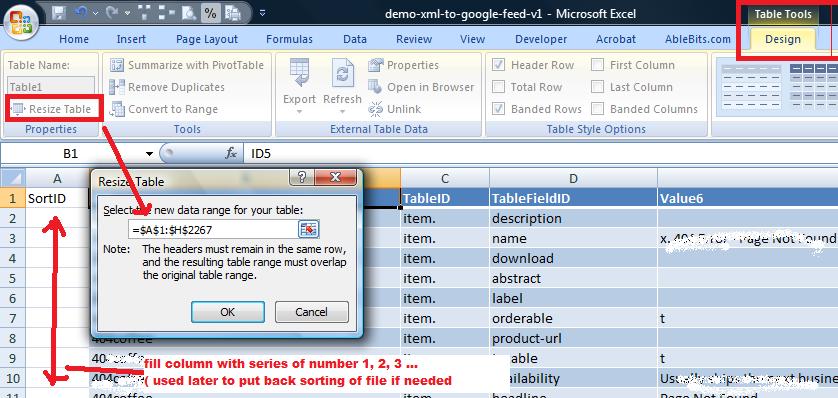


to be continued ...
Contact me if you need more information on how the get this Google feed converted.
Google Data Feed Specifications:
http://www.google.com/support/merchants/bin/answer.py?hl=en&answer=188494
Tried some XML editors and converters but they were too complicated. This XML editor has a free 30 day trial if you want to try it:
Saturday, October 2, 2010
Ideas on How to Fix the Flip Video
If it's under warranty call or contact Flip Video (division of Cisco): http://www.theflip.com/en-us/support/ (try the 24/7 chat)
If you out of warranty or too impatient to call support here a few things:
RESET BUTTON on Flip Video
from youtube user http://www.youtube.com/user/glenwoodfin
REMOVE BATTERY (try to reboot the bios).
A solution to the dreaded charging error of the Flip Ultra Hd.
Steps from youtube user http://www.youtube.com/user/MYOLDNEIGHBORHOOD
1. Take battery out of camcorder.
2. plug camcorder in computer.
3. once it is connected and the computer recognizes it (either you hear a sound, and or it goes to autoplay) place battery in camcorder. (the batter that it came with)
4. safe eject camera. You know its safe eject if there is an icon on your notification panel on the bottom right hand of your screen. (windows)safe eject means to right click on the safe eject button in the bottom right side of your screen on your computer and then click safely remove hardware.
5. plug camcorder back in and let it charge.
6. pray it works. It will!!!!!!!!!!!
If you out of warranty or too impatient to call support here a few things:
RESET BUTTON on Flip Video
from youtube user http://www.youtube.com/user/glenwoodfin
REMOVE BATTERY (try to reboot the bios).
A solution to the dreaded charging error of the Flip Ultra Hd.
Steps from youtube user http://www.youtube.com/user/MYOLDNEIGHBORHOOD
1. Take battery out of camcorder.
2. plug camcorder in computer.
3. once it is connected and the computer recognizes it (either you hear a sound, and or it goes to autoplay) place battery in camcorder. (the batter that it came with)
4. safe eject camera. You know its safe eject if there is an icon on your notification panel on the bottom right hand of your screen. (windows)safe eject means to right click on the safe eject button in the bottom right side of your screen on your computer and then click safely remove hardware.
5. plug camcorder back in and let it charge.
6. pray it works. It will!!!!!!!!!!!
Monday, September 13, 2010
FYI: Earn commissions by recommending SplashID and other SplashData products

About SplashData's Affiliate Program
SplashData's Affiliate Program provides great benefits to its partners as well as association with one of the market leaders in mobile security and productivity. Some highlights of the new Affiliate Program include:
- Generous Commission Structure - 10% commission on all SplashData product sales generated. Bonuses and increased commission rates for high performing affiliates.
- Customer Specials and Discounts – These rotating specials can range from 5% off all SplashData products for your visitors or clients to "Buy 1, Get 1 Free" promotions.
- Ready-To-Use Marketing Content – SplashData logos, screenshots, marketing copy and banner ads.
- Sales Support - Tips, tricks, and tools from us on how to sell more products, generate more traffic and increase your commissions.
Become a fan on:
Follow us on:
© SplashData, Inc. All Rights Reserved.
201 Los Gatos-Saratoga Road, Los Gatos, CA 95030


Sunday, August 29, 2010
Facebook Developers - Put Like Button on any Web Page
Facebook Developers
Experience the web with Facebook friends.
Social plugins let you see what your friends have liked, commented on or shared on sites across the web. All social plugins are extensions of Facebook and are specifically designed so none of your data is shared with the sites on which they appear.
http://developers.facebook.com/plugins
http://developers.facebook.com/plugins
Saturday, August 28, 2010
iBART (Free)
Check out this application: San Francisco Bay Area BART Maps & Schedule. http://itunes.apple.com/us/app/ibart-free/id288656960?mt=8
Sent from my iPhone
Sent from my iPhone
Friday, August 27, 2010
Sony’s $129 N100 Media Player
Stream Internet Video and music. (YouTube, Pandora, Slacker, NPR) to any TV.
Also reads USB Stick and Network Media shares for a huge range of sharing options.
Connects by network cable or wirelessly.
Available soon.
Also reads USB Stick and Network Media shares for a huge range of sharing options.
Connects by network cable or wirelessly.
Available soon.
Sunday, August 8, 2010
Untitled
“The difference between ordinary and extraordinary is 5 letters, all found on the left side of your keyboard.”
Jimmy Johnson quotes“The difference between ordinary and extraordinary is that little extra.”
Quote By A Lefty
----
Jimmy Johnson quotes“The difference between ordinary and extraordinary is that little extra.”
Sent from my iPhone
Sunday, August 1, 2010
Yahoo Weather Widget Glitch?
4 degrees Farenheit in Sunnyvale CA?
August 1, 2010
Yahoo Weather widget has a very low temp. Seen at My.Yahoo.com moon weather graphic and the graphic on weather.yahoo.com graphic. You see a large 4• with the correct temp under.


Also, my Lotto App had a little glitch today.
Shows the next lotto drawing on Dec. 31, 1969. August 1st has some bugs.


August 1, 2010
Yahoo Weather widget has a very low temp. Seen at My.Yahoo.com moon weather graphic and the graphic on weather.yahoo.com graphic. You see a large 4• with the correct temp under.


Also, my Lotto App had a little glitch today.
Shows the next lotto drawing on Dec. 31, 1969. August 1st has some bugs.

Tuesday, July 27, 2010
Why does iPhone take so long to back up? - Mac Forums
Why does iTunes update requires a reboot.
Sometimes slower equals safer and more reliable, and Apple is asking for progress along the way via internet.
More iPhone Backup Info: http://forums.macrumors.com/showthread.php?t=549798
Things that install quickly usually use the Microsoft components and are then depend on MS for future updates.
Sometimes slower equals safer and more reliable, and Apple is asking for progress along the way via internet.
More iPhone Backup Info: http://forums.macrumors.com/showthread.php?t=549798
Things that install quickly usually use the Microsoft components and are then depend on MS for future updates.
Thursday, July 22, 2010
iPhone Web App - Yahoo Mail 4.0
This iPhone Safari browser app for Yahoo email looks great, has lots of desktop features and works great. http://m.yahoo.com/ Works better than the App since you don't have to keep jumping from App to browser. The full email search is helpful and the image handling is better than desktop.


Sunday, July 18, 2010
Apple's iPhone 4 Problem. Report Before and After the Press Conference
iPhone Press Conference with Steve Jobs July 2010
Thursday, July 15, 2010
iPhone 4 Antenna Problem a Feature Not a Glitch
If Apple was aware of the Antenna issue, maybe they meant to make it into a "Quick Call Drop" feature.
Example: iPhone Usage: - QCD (Quick Call Drop): To quickly drop a call from the AT&T network, touch lower left corner of of the iPhone 4.
Today: Apple calls reporters to an iPhone 4 news conference. Woz offers iPhone signal advice. Plus: Google, AMD earnings. Silicon Valley home sales. Larry Ellison won't be buying the Golden State Warriors. And: Another Netflix deal. View Full Story
http://www.tipb.com/2009/12/07/att-releases-mark-spot-iphone-app-network-quality-feedback/
http://vodpod.com/watch/3905239-iphone-4-call-drop-issues
Monday, July 12, 2010
San Francisco to Host 34th America's Cup - Sailing Races
Thanks to database, software and tech genius Larry Ellison, who owns BMW Oracle Racing, San Francisco is the sole U.S. Candidate host the next America's Cup. The BMW Oracle Sailing Racing Team, winner or the 33rd America's Cup and hence Defender for the next Match will choose the venue.
The 34th America’s Cup is scheduled for 2013 or 2014, the year to be determined by infrastructure development lead-times.
The longest running sport cup challenge has a long long selection process, so the final decision will be announced by the end of 2010. Four European countries are also being studied by the American Defender BMW Oracle Racing team.
GGYC/BOR will announce a final decision on the venue, along with the date and other details of the next America’s Cup by the end of this year.

Read About it on the America's Cup Website:
http://www.americascup.com/news/san-francisco-sole-usa-host-city-candidate-for-34th-americas-cup/
34th America's Cup Defender: http://www.ggyc.com/
SF Gate Info: Read more: http://www.sfgate.com/cgi-bin/article.cgi?f=/n/a/2010/07/08/sports/s081705D67.DTL#ixzz0tWDAabKe
Other Info: http://www.americascup.com/34th-americas-cup-news/
Read about the America's Cup Trophy: http://www.americascup.com/feature-stories/the-americas-cup-trophy/
The 34th America’s Cup is scheduled for 2013 or 2014, the year to be determined by infrastructure development lead-times.
The longest running sport cup challenge has a long long selection process, so the final decision will be announced by the end of 2010. Four European countries are also being studied by the American Defender BMW Oracle Racing team.
GGYC/BOR will announce a final decision on the venue, along with the date and other details of the next America’s Cup by the end of this year.

Read About it on the America's Cup Website:
http://www.americascup.com/news/san-francisco-sole-usa-host-city-candidate-for-34th-americas-cup/
34th America's Cup Defender: http://www.ggyc.com/
SF Gate Info: Read more: http://www.sfgate.com/cgi-bin/article.cgi?f=/n/a/2010/07/08/sports/s081705D67.DTL#ixzz0tWDAabKe
Other Info: http://www.americascup.com/34th-americas-cup-news/
Read about the America's Cup Trophy: http://www.americascup.com/feature-stories/the-americas-cup-trophy/
Apple iPhone 4 Must Read
Consumer Reports can't recommend iPhone 4 because of antenna problems
Read more: http://www.sfgate.com/cgi-bin/blogs/techchron/detail?entry_id=67654#ixzz0tW9UIb9g
iPhone 4 Antenna Review
DON'T TOUCH THE LOWER LEFT CORNER.
OR
BUY A CASE OR PUT SOME DUCT TAPE OR RUBBER OVER THE LOWER LEFT CORNER.
All modern Cell phone have some antenna problems, read the stickers that you pulled off your last phone.
Read more: http://www.sfgate.com/cgi-bin/blogs/techchron/detail?entry_id=67654#ixzz0tW9UIb9g
iPhone 4 Antenna Review
How to Fix iPhone 4 Antenae problem?
DON'T TOUCH THE LOWER LEFT CORNER.
OR
BUY A CASE OR PUT SOME DUCT TAPE OR RUBBER OVER THE LOWER LEFT CORNER.
All modern Cell phone have some antenna problems, read the stickers that you pulled off your last phone.
Subscribe to:
Posts (Atom)